published: 10.09.25
most recent update: 04.10.25
Normal support for Windows 10 is being discontinued by Microsoft on 14.10.2025.
Summary:
If you have a PC or laptop running Windows 10, it won't receive any more security updates after 14.10.2025: that means you're at a much higher risk of your computer being hacked. Without being overly dramatic, that's really not a good thing: I'd strongly advise you to do something about it.
What to do next:
You have a number of choices at this time: some are potentially free, some will cost money:
- Get extended support for 12 months (till 14.10.2026) from Microsoft, either for free, in exchange for some "Microsoft Rewards Points", or for a small charge (typically around £30), by enrolling in the "Windows 10 ESU".
- If you're in the EEA (e.g. you reside in Germany, Lithuania, Spain, etc.), you will get free extended support for 12 months (till 14.10.2026): you will be enrolled in the Windows 10 ESU from the end of September 2025 onwards. However, you will need to log into a Microsoft account every 60 days. This free offer is not available to users in the UK: you can thank Brexit for that.
- If your computer is provided by your employer, they may be able to get extended commercial support from Microsoft for one to three years: talk to your employers IT Support
- If your computer supports it, upgrade to Windows 11 for free: Windows 11 is currently supported by Microsoft, and they will continue to support it for the foreseeable future
- If your computer doesn't support Windows 11, you can investigate the possibility of upgrading the hardware so it actually -CAN- support Windows 11. There will be associated costs, and they may be quite low. But in some cases the costs might be higher than just buying a new PC (see below), especially if your computer is more than 10-12 years old
- If your computer doesn't support Windows 11, you can look at buying a new computer that -DOES- support Windows 11: there's obviously non-trivial costs associated with that (make sure you re-purpose / recycle the old one!)
- Install Windows 10 "Enterprise IoT 2021 LTSC", a different edition of Windows 10 - this comes with associated costs and various important caveats, but should be supported until around 13.01.2032
- Install a different operating system such as Linux Mint - this can be done quite cheaply, potentially for free, but again, comes with certain important caveats. It will however, be supported for the foreseeable future
Remember, you need to get something in place by 14.10.2025: doing nothing will mean your data and your computer are at risk
Windows 10 ESU: Extended Support Updates:
Microsoft have recently announced Windows 10 Extended Support Updates (ESU), which will provide security updates for Windows 10 for one additional year, until 14.10.2026.
This is a good thing.
You can enrol your computer with Windows 10 ESU either for around £30, or for free: if you have an account with Microsoft, e.g. a subscription to Microsoft Office / Microsoft 365, you can probably enrol for free. If you're able to collect 1,000 Microsoft Reward Points, you can also enrol in the ESU for free. Worst case, you can pay a one-time fee of about £30 (+VAT?).
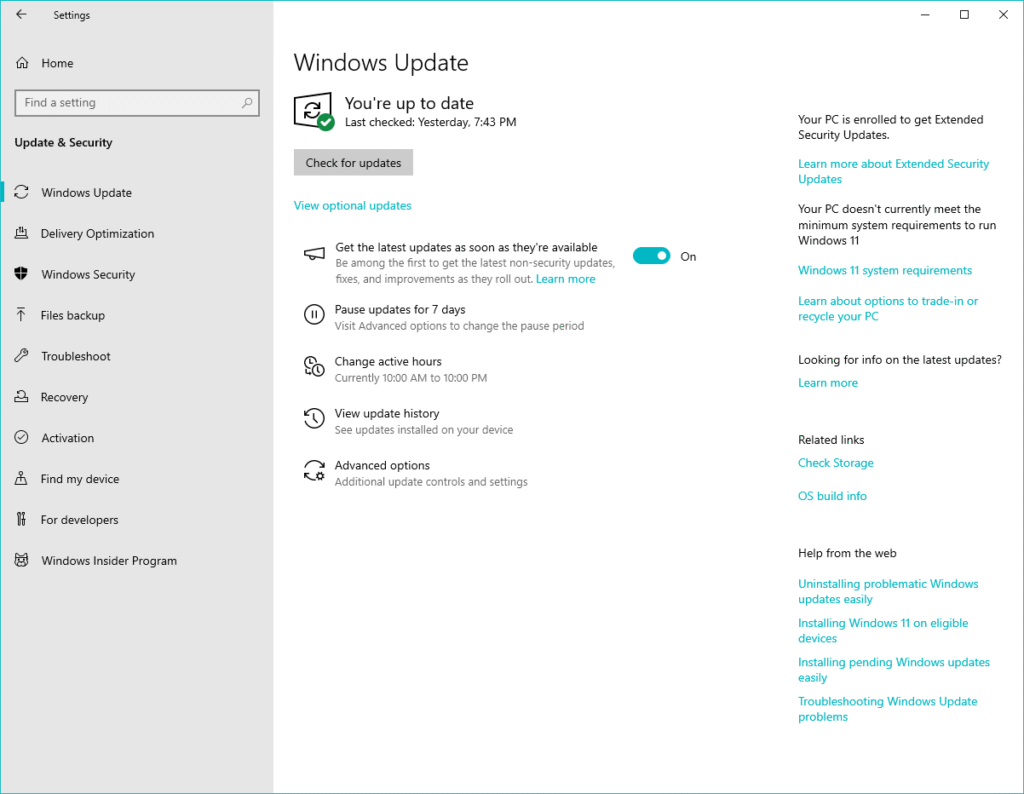
The ESU enrolment option is normally shown in the Settings app, under "Windows Update". There's anecdotal evidence that the Enrolment option is not appearing for everyone yet. You may potentially need to wait till the middle / end of September 2025 to see it (it is, however, definitely possible to "nudge" Windows into showing the ESU enrolment option now, if you really don't want to wait).
Once you've successfully enrolled, you'll see the following message at the top right of the "Windows Update" screen:
"Your PC is enrolled to get Extended Security Updates"
There's more information about the ESU here: